Time Series
Time series is a core capability across Columns connectors.
Quick demo: Time Series
Enable Time Series
When your dataset includes a time column, enable time-series mode during connection setup.
Supported format families include:
- US date (
M/d/yy,MM/dd/yy) - US full date (
M/d/yyyy,MM/dd/yyyy) - US date+minute
- US datetime
- US full datetime
- ISO date (
yyyy-MM-dd) - ISO datetime (
yyyy-MM-dd HH:mm:ss) - ISO timestamps (
yyyy-MM-dd'T'HH:mm:ss...)
Common examples:
1/2/221/2/20221/2/22 9:081/2/22 14:22:301/2/2022 14:22:302021-03-122021-03-12 15:32:452021-01-01T20:07:08.595Z2021-11-11T04:08:23-09:00
Continuous vs Bounded Time
Timeline aggregation modes:
- Continuous: fixed-width rolling windows
- Bounded: calendar-aligned buckets (day, week, month, quarter, year)
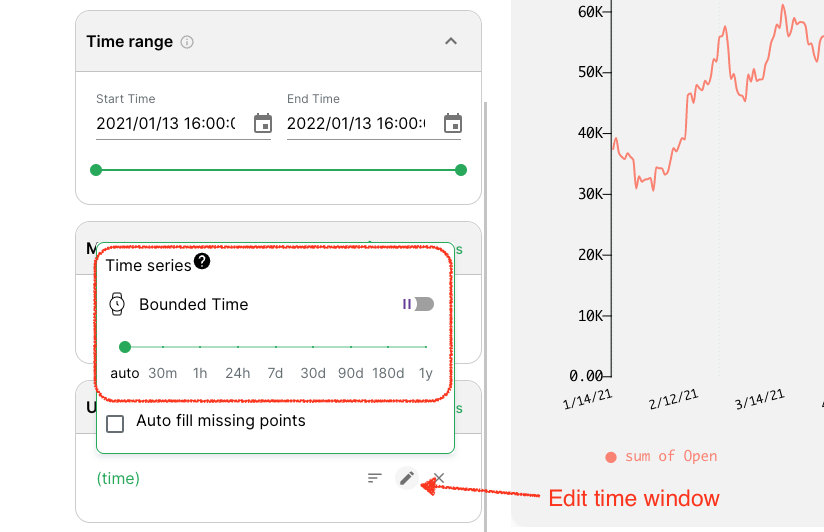
Use bounded mode for most reporting scenarios, and continuous mode for moving-window analysis.
Forecast
Columns also supports built-in forecasting on timeline charts. See Timeline for details.