HTTP API
If a tool doesn't have a dedicated connector but does have an API, connect it over HTTP. Columns can read JSON responses from REST APIs and CSV/TSV files served over HTTP.
Connect
-
Choose Connect URL. The Connect HTTP API dialog opens.
-
Enter the HTTP endpoint URL (
http://orhttps://). -
Add request headers if the API needs them, typically for authentication:
Authorization: Bearer <your-token> -
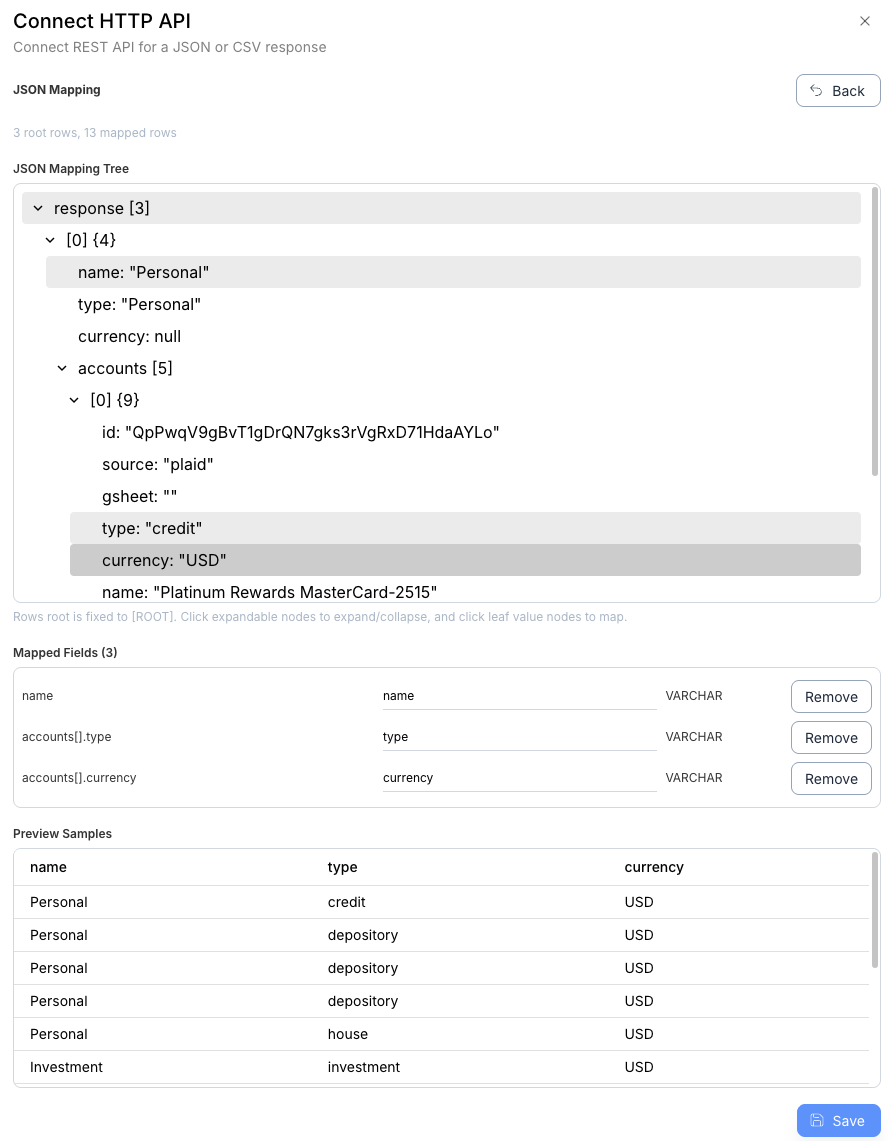
For JSON, use the JSON Mapping Tree to pick the node that holds your records, for example
data.items. Each object in that array becomes a row. -
Check the Preview Samples, then save the source.
Examples
| Endpoint returns | Select |
|---|---|
[{...}, {...}] | The root |
{ "results": [{...}] } | results |
{ "data": { "orders": [{...}] } } | data.orders |
Nested objects inside each record are flattened into columns. Use a Flow transformation to rename or reshape them.
Keeping it in sync
Each sync calls the endpoint again. Put the flow on a schedule to keep it current.
Tips
- Use an API token with read-only permissions.
- If the API pages its results, request a page size big enough for your data, or point Columns at an export endpoint.
- Background on HTTP sources: Support HTTP data source.